
Description
This is a belt throughput counter/monitor.
It shows the percentage of the throughput.
Just connect the substation with a green wire to your belt(s) and configure the belt(s) like this:
- UNCHECK Enable/disable
- CHECK Read belt contents
- make sure the Content read mode is Pulse
The Counter can be configured differently by changing the parameters in the constant combinator on the top-right corner of the counter
-
- Jan 2020: Release
- UPDATE | 2. Mar 2020: added a version with bigger display
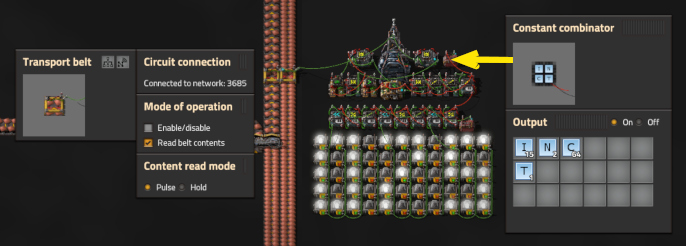
Parameters to be configured:
- I: This value is the belt speed per second. Yellow belt = 15; Red belt = 30; Blue belt = 45
- __N:__The number of belts beein watched [1,2,3,4,5,...]
- C: Amount of ticks* (time) in which the items are monitored. This affects the refresh rate [32,64,128,...]
- T: Start parameter for the timer. do not change
Example for N=5
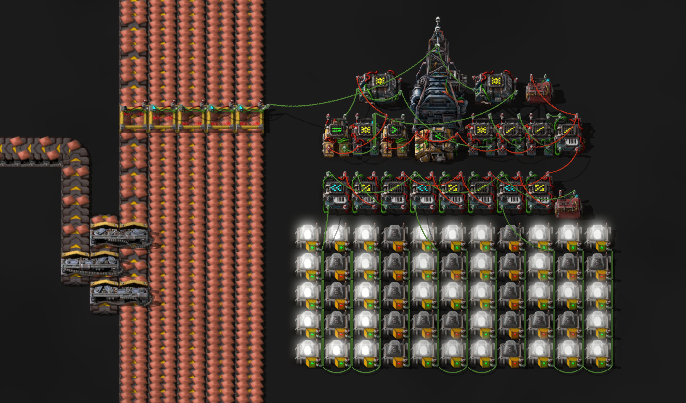
(*) A Item needs 8/15 seconds (= 32 ingame ticks) to pass a transport belt tile. The monitor counts within a constant time periode (Value: I) the number of items and calculates the throughput. the lower the value the faster is the monitor but it will get more volatile. For example I=32 will set the refresh rate to about 0,5s (32/60 ticks per second). I=128 will set the refresh rate to about 2s (128/60 ticks per second)
Feel free to use or change this tool to your needs. The number display is optional. it can be removed or replaced